



. . .

Run a Command as Administrator from the Windows 7 / Vista

Published: February 14, 2011

 To try this out, go to the run box and type in something (cmd, for example)
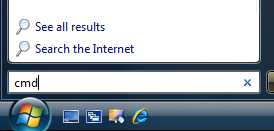
Now instead of hitting the Enter key, use Ctrl+Shift + Enter. You will be prompted with the obnoxious User Account Control dialog… but it will then open up a command prompt in Administrator mode.


Source: http://www.howtogeek.com/howto/windows-vista/run-a-command-as-administrator-from-the-windows-vista-run-box/

Don't forget to share this post

    Let's Build Digital Excellence Together


    • Cost Efficient Solutions.
    • Minimal Timelines.
    • Effective Communication.
    • High Quality Standards.
    • Lifetime Support.
    • Transparent Execution.
    • 24/7 Availability.
    • Scalable Teams.

    Join Our 200+ Happy Clients Across Globe


    Free Consultation.

      Do you need help in strategy, innovation or growth of your startup/business? Experts from our team will get in touch with you.

      Please do not post jobs/internships inquiries here.