

. . .

Every RFP.
One Dashboard.
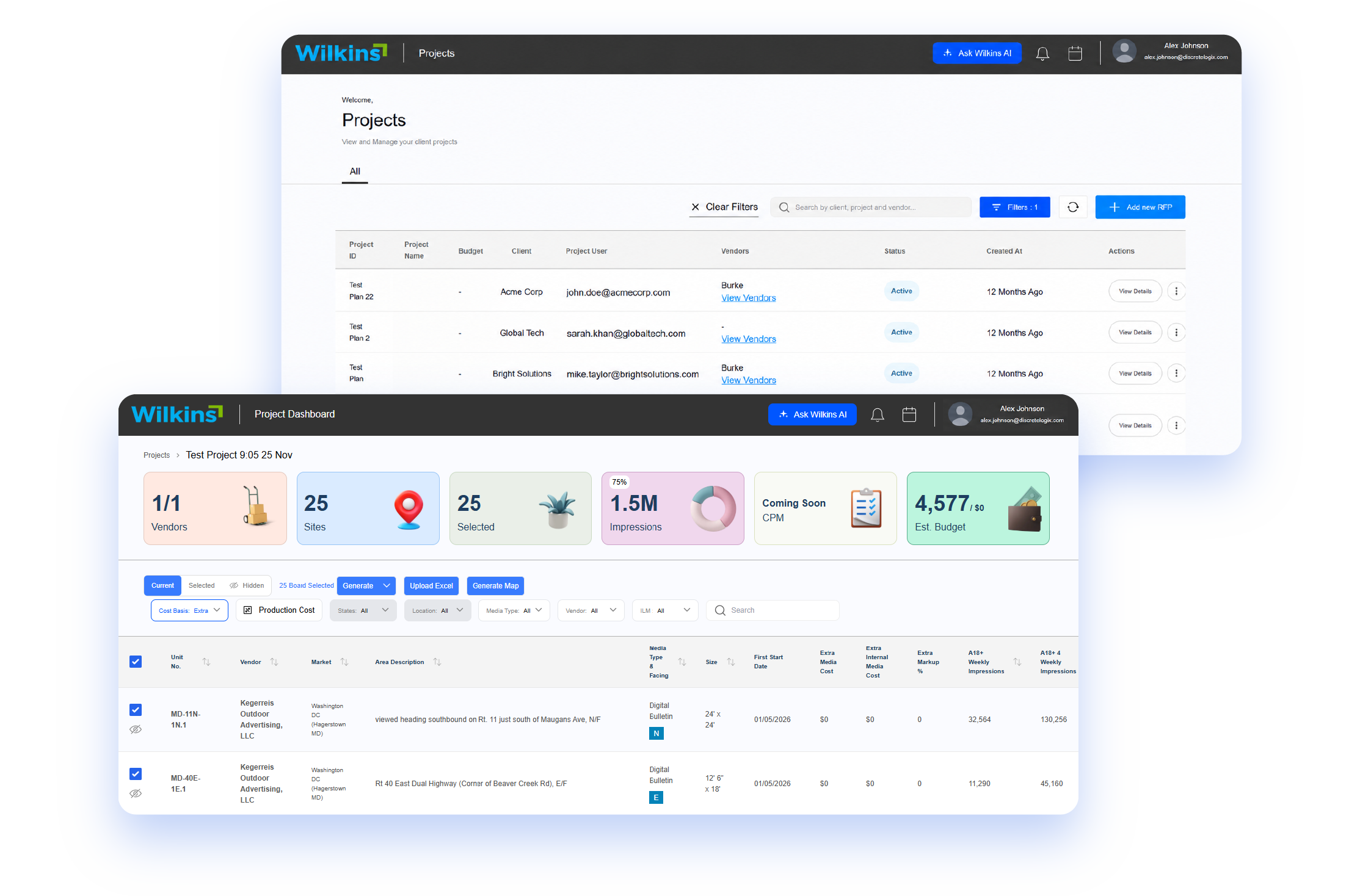
A custom-built RFP and media management dashboard that takes Wilkins Media’s out-of-home proposals from scattered vendor files to client-ready spreadsheets and PowerPoint decks.

Vendor files in

PDF

Excel

CSV

check

Exported in one click

3 spreadsheets + 1 PowerPoint

The project at a glance

A fully custom platform, built from the ground up around how Wilkins Media plans, prices and delivers proposals.
glance ring blue

5

Development milestones, delivered with continuous review from the Wilkins team.
glance ring cyan

6

Live KPI cards on every project dashboard.
glance ring blue

3 + 1

One-click exports: submission, client and master spreadsheets, plus a PowerPoint deck.
glance ring green

3

Vendor file formats processed: PDF, Excel and CSV.

Mission

Turn scattered vendor submissions into polished, client-ready proposals from one dashboard

Bring the entire out-of-home RFP workflow, from setup and vendor files to pricing and delivery, into one custom-built platform.

The problem

Behind every billboard, transit ad and digital screen is an RFP, and behind every RFP is a stack of vendor submissions. For Wilkins Media, those arrived as PDFs, Excel sheets and CSV files, each with its own layout, naming and pricing. Before a client saw a single number, the team had to collect, clean, compare and reformat every file.

Why a custom solution

No two RFPs were alike, so every proposal meant rebuilding spreadsheets and slides around a new set of requirements. Discretelogix built a dashboard from the ground up, where the team sets up RFPs, processes vendor files, reviews and prices media units, and exports client-ready deliverables in one click.

Wilkins Media

Client

Out-of-Home Media

Vertical

United States

Origin Territory

Web Dashboard

Platform

Custom Build

Classification

5 Milestones

Delivery

Two-Tier

Architecture

Next.js, FastAPI

Arsenal

Objectives

What the platform had to deliver

Three objectives shaped every decision, from the first column to the final export.

Primary goal

Help Wilkins Media transform vendor submissions into polished, client-ready proposals faster and more accurately.

Target audience

Wilkins Media’s media planning and RFP teams, and the brands and agencies that receive their proposals.

Platform requirements

A flexible system that handles different RFP requirements, processes vendor files in multiple formats, keeps pricing and data consistent, and fits the team’s existing workflow.

Targets

The impact the platform was built for

Five targets that define success for Wilkins Media, from one shared dashboard to a workflow built around how the team works.

1 dashboard

Centralized RFP management

Setup, vendor files, pricing and delivery live in one dashboard instead of scattered files and tools.

1 version of the data

Consistent client-ready deliverables

Values, pricing and layouts match across every spreadsheet and slide, so clients always see the same data.

3 + 1 exports

One-click spreadsheet and PowerPoint exports

Submission, client and master spreadsheets plus a PowerPoint presentation, generated together and ready to share.

6 KPI cards

Live campaign KPIs

Vendors, sites, impressions, CPM and estimated budget, visible at a glance on every project dashboard.

Built from the ground up

A workflow tailored to Wilkins Media

Columns, cost basis and export order follow how the Wilkins team actually reviews and delivers proposals.

Challenges

What stood in the way

Five recurring problems made every proposal harder than it needed to be.

Different requirements for every RFP

Each client wanted different information, column arrangements and priorities. Fixed columns couldn’t keep up.

Inconsistent data presentation

Values and pricing appeared differently across spreadsheets and presentations.

Exports that didn’t match the workflow

Exported files needed manual rearranging before they could be shared.

Multiple cost sources

Email-based and manually entered costs were difficult to manage together.

Easy-to-miss exceptions

Units requiring forced production were hard to spot in large datasets.

Every challenge has a matching fix

Each problem maps to a targeted solution inside the same dashboard.

Solutions

How Discretelogix solved each one

Every challenge got a targeted fix, built into the same dashboard the team uses every day.

Fixes: different requirements for every RFP

Dynamic column management

Add, remove and reorder columns for each RFP, with the relevant fields pre-selected in a guided setup.
check circle

Add and remove columns

check circle

Reorder by priority

check circle

Pre-selected fields

check circle

Guided three-step setup

Fixes: inconsistent data presentation

Consistent data formatting

Values and pricing are standardized across every output, so clients always see one consistent version of the data.
check circle

Standardized values

check circle

Consistent pricing

check circle

Spreadsheets and slides match

check circle

One version of the data

Fixes: exports that didn’t match the workflow

Aligned exports

Exported files follow the same vendor order and column placement the team uses in the dashboard, so what they review is what the client receives.
check circle

Same vendor order

check circle

Same column placement

check circle

Master, client and submission Excel

check circle

PowerPoint deck

Fixes: multiple cost sources

Centralized cost management

Email-based and manually entered costs come together, showing only the options that apply to each RFP. Teams set a custom cost basis and adjust markups, rates and production costs in place.
check circle

Email and manual costs

check circle

RFP-specific options

check circle

Custom cost basis

check circle

In-place markup and rates

Fixes: easy-to-miss exceptions

Highlighted exceptions

Targeted cell highlighting flags units that need forced production, without cluttering the rest of the view.
check circle

Targeted cell highlighting

check circle

Forced-production flags

check circle

Uncluttered view

check circle

Easy to spot in large datasets

Also built into the platform

file plus

Guided RFP setup

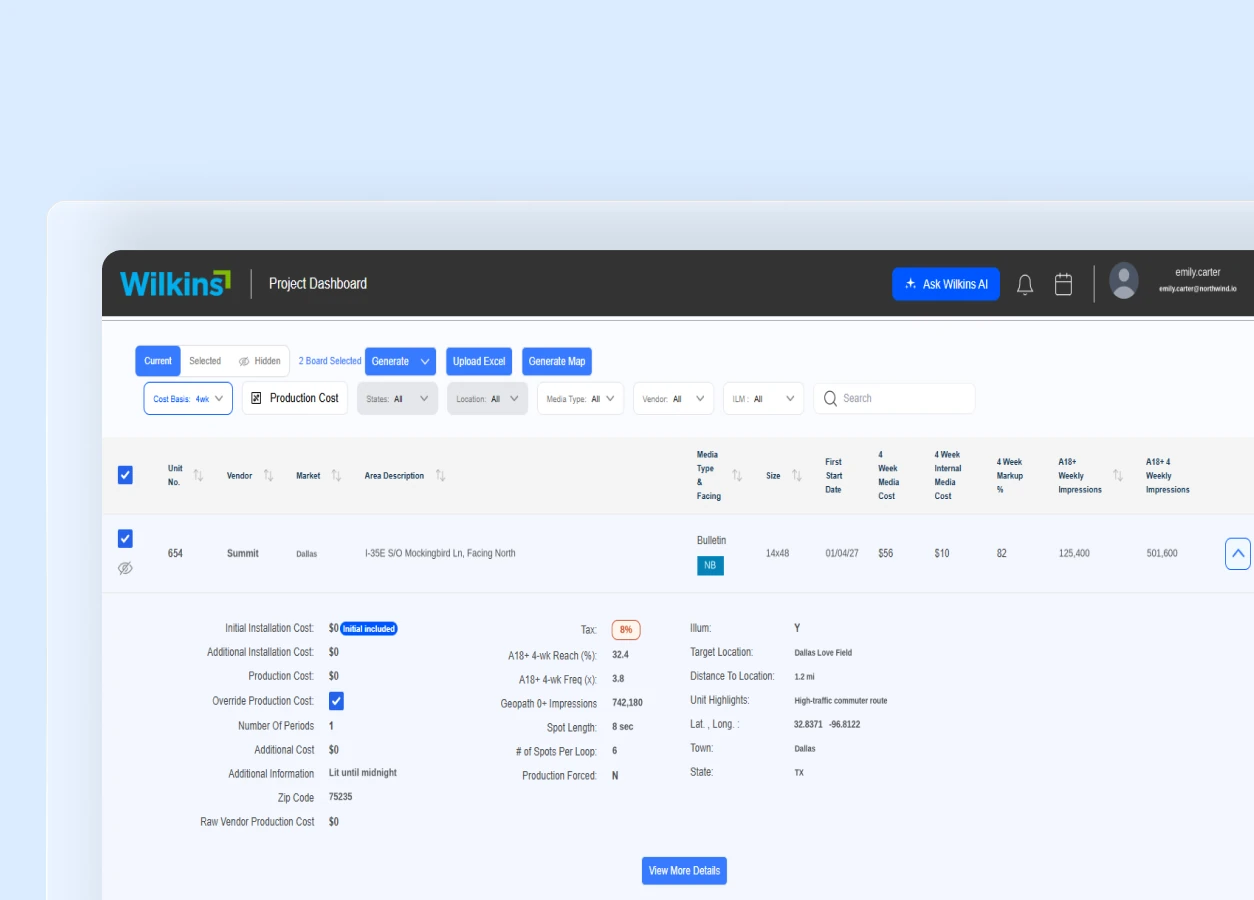
A three-step flow to create an RFP, choose its columns and configure settings.
upload

Vendor file uploads

PDF, Excel and CSV submissions processed into structured media data.
bar chart

Live KPI dashboard

Project health at a glance, from vendor count to estimated budget.
search

Smart filtering and search

Narrow media units by state, location, media type or vendor.
eye

Detailed media-unit view

Pricing, reach and frequency, location details and imagery for any unit.
presentation

Automated Excel and PowerPoint exports

Client-ready files generated straight from the dashboard.

Process

Our Process: From Concept to a Custom-Built Solution

A structured approach to turning Wilkins Media’s requirements into a scalable, intuitive RFP management platform.

01

Discovery & Planning

Understanding Wilkins Media’s existing workflows, business challenges and requirements to define the project direction.

02

Research & Strategy

Mapping the RFP workflow, identifying key functionalities and planning a solution around the team’s operational needs.

03

UI/UX Design

Designing an intuitive dashboard experience with clear data structures, flexible columns and easy navigation.

04

Prototyping & Validation

Developing interactive prototypes to explore workflows, refine layouts and validate the experience before development.

05

Development & Integration

Building the custom platform with Next.js and FastAPI, integrating AI-powered processing and automated exports.

06

Testing & Delivery

Testing core workflows, refining functionality and delivering a complete platform through five development milestones.

Results

What Wilkins Media gained

A file-by-file process became one consistent workflow, from the first vendor file to the final client deck.

Centralized workflow

The complete RFP process, from setup to delivery, now happens in one dashboard.

Consistent deliverables

Spreadsheets and presentations keep the same data, formatting and ordering, every time.

Automated exports

Three spreadsheets and one PowerPoint presentation are generated with a single click.

3 spreadsheets + 1 deck

Better campaign insights

Six live KPI cards help planners monitor vendors, sites, impressions, CPM and estimated budgets.

6 live KPI cards

A custom-fit platform

The solution follows Wilkins Media’s actual workflow and client requirements.

Every RFP. One Dashboard.

From the first vendor file to the final client deck.

Squads

The Team Behind the Success

Squads, not departments, shape our organization
sqd-dev-ninjas

Coding

Dev Ninjas
cs-weblif-hunter

QA

Bug Hunters
sqd-planning-maestros

Management

Planning Maestros
sqd-graphic-gurus

UI / UX

Graphic Gurus

Arsenal

Best-of-breed tools
& platforms

A two-tier architecture with a Next.js frontend and FastAPI backend, extended with ChatGPT API integration and automated Excel and PowerPoint exports.

Next.js

Frontend for the RFP dashboard

FastAPI

Backend for the platform

ChatGPT API

AI integration within the platform

Excel

Submission, client and master spreadsheets

PowerPoint

Automated client presentation export

Two-tier architecture

Next.js frontend and FastAPI backend
✕

  • Cost Efficient Solutions.
  • Minimal Timelines.
  • Effective Communication.
  • High Quality Standards.
  • Lifetime Support.
  • Transparent Execution.
  • 24/7 Availability.
  • Scalable Teams.

Join Our 200+ Happy Clients Across Globe


Free Consultation.

    Do you need help in strategy, innovation or growth of your startup/business? Experts from our team will get in touch with you.

    Please do not post jobs/internships inquiries here.
    ✕

    ✕