



. . .

Run a Command as Administrator from the Windows 7 / Vista

Published: February 14, 2011

On This Page

     To try this out, go to the run box and type in something (cmd, for example)
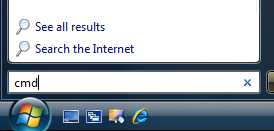
    Now instead of hitting the Enter key, use Ctrl+Shift + Enter. You will be prompted with the obnoxious User Account Control dialog… but it will then open up a command prompt in Administrator mode.


    Source: http://www.howtogeek.com/howto/windows-vista/run-a-command-as-administrator-from-the-windows-vista-run-box/

    Don't forget to share this post

      Let's Build Digital Excellence Together


      • Cost Efficient Solutions.
      • Minimal Timelines.
      • Effective Communication.
      • High Quality Standards.
      • Lifetime Support.
      • Transparent Execution.
      • 24/7 Availability.
      • Scalable Teams.

      Join Our 200+ Happy Clients Across Globe


      Free Consultation.

        Do you need tech help of your startup/business? Experts from our team will get in touch with you.

        Please do not post jobs/internships inquiries here.